Morphowiki 使用者手冊
透過 LLM 自動建立字根字首字尾雙向連結的單字庫,並使用 SM-2 間隔重複演算法強化字彙記憶。
Morphowiki User Manual
A guide for users to use an LLM to build your own cross-linked morpheme dictionary and reinforce your own vocabulary with SM-2 spaced repetition.
快速安裝
兩種方式,擇一即可:
最簡單:請 LLM 幫你裝
不會用指令也沒關係。打開 Claude Code,直接用一句話請它代勞:
請從 https://github.com/yaoting-chen/Morphowiki.git
clone 這個專案,並依照 README 幫我安裝、完成初始化。
Claude 會自動下載專案、讀取 README、裝好需要的環境,再執行
/setup 完成初始化,你只要在旁邊看著就好。
或者,自己用 git clone
git clone https://github.com/yaoting-chen/Morphowiki.git
cd Morphowiki
再用 Claude Code 開啟這個資料夾,執行 /setup
就完成了。需要逐步畫面說明,請見入門設定。
Quick install
Two ways — pick whichever you prefer:
Easiest: let the LLM install it for you
No command line needed. Open Claude Code and just ask, in plain language:
Please clone https://github.com/yaoting-chen/Morphowiki.git
and install it for me by following the README, then finish setup.
Claude downloads the project, reads the README, sets up what's
needed, and runs /setup to initialize — you just watch
it happen.
Or do it yourself with git clone
git clone https://github.com/yaoting-chen/Morphowiki.git
cd Morphowiki
Then open the folder in Claude Code and run /setup. For a
click-by-click walkthrough, see
Getting Started.
手冊適用對象
適合想利用 LLM 建立個人英文字彙庫的使用者。您不需要具備程式設計背景,只需能:
- 從官方網站下載並安裝軟體
- 依照步驟導引進行操作
- 參照本手冊範例與畫面訊息進行比對
如果您對「Claude 是什麼?」感到陌生,請先閱讀入門設定;若已安裝 Claude Code,可直接跳轉至下方的 Skills 區。
Who this manual is for
For any user who wants to use an LLM to build a personal English vocabulary library. You don't need to code, but you should be able to:
- Download and install software from official sites
- Follow numbered steps
- Compare on-screen messages with the examples in this manual
If "What is Claude?" sounds unfamiliar, start with Getting Started. If you already have Claude Code, jump to the Skills section below.
主要功能
Morphowiki 知識庫
每個單字將自動拆解為字首、字根與字尾,並建立雙向參照連結。例如點擊
international 即可查看其構成(inter- +
nat + -ion +
-al);反之,點擊
nat 則能找出所有包含該字根的單字。
SM-2 複習介面
內建本機伺服器與卡片複習介面。您可根據記憶程度(Again / Hard / Good / Easy)進行評分,系統會自動安排下次複習日期,所有資料均妥善儲存於本機環境。
Claude Code Skills
提供七個專屬指令(/setup、/ingest、/new-word、/stopword、/flashcard、/review-word、/lint),自動化處理單字分析、加入複習清單、啟動網頁等繁雜步驟。
What you get
Morphowiki dictionary
Every word is broken into prefixes, roots, and suffixes, with
two-way back-links. Click international to see
inter- + nat + -ion +
-al; click nat and see every word
built on that root.
SM-2 review web app
A local server with a flip-card review UI. You grade yourself "Again / Hard / Good / Easy", and the system schedules the next review date. All data stays on the device.
Claude Code skills
Seven slash-commands (/setup, /ingest,
/new-word, /stopword,
/flashcard, /review-word,
/lint) automate analysis, flashcard creation, and
launching the review site.
系統架構概覽
整個專案以您為中心:在 Claude Code 執行指令,由其操作本機檔案、啟動伺服器,再透過瀏覽器進行卡片複習。所有資料皆儲存在您的電腦中,無須雲端帳號。
使用者
  ▼ 執行 /ingest、/flashcard、/review-word 等指令
Claude Code (7 個技能組)
  ▼ 讀寫 Markdown 與 JSON
本機檔案 (受完整本地端管理)
  · dictionary/words/
  · dictionary/prefix/、root/、suffix/
  · dictionary/stopwords.md
  · review/flashcards.json
  · review/server.js + web/
  ▼ 執行 /review-word 啟動本機伺服器
http://localhost:5173 (僅限 127.0.0.1 存取)
  ▼ HTTP
您的瀏覽器:翻卡複習、SM-2 評分
How the pieces fit together
One person plays every role in this project: you type commands in Claude Code; Claude Code reads and writes local files and starts a tiny local server; then you open a browser to flip cards. All data stays on your computer — no cloud, no account.
You
  ▼ runs /ingest, /flashcard, /review-word, ...
Claude Code (seven skills)
  ▼ reads / writes markdown and JSON
Local files (stay local, no cloud)
  · dictionary/words/
  · dictionary/prefix/, root/, suffix/
  · dictionary/stopwords.md
  · review/flashcards.json
  · review/server.js + web/
  ▼ /review-word starts the local server
http://localhost:5173 (bound to 127.0.0.1, not exposed)
  ▼ HTTP
Your browser: flip cards, SM-2 grading
複習介面預覽
執行
/review-word
後,即可在瀏覽器開啟卡片複習介面。卡片正面顯示英文單字,點擊後展開
IPA
音標、詞性、中文釋義、語素拆解,以及可收合的詞源與記憶法。底部的四色按鈕對應
SM-2 評分等級,評分後自動跳轉下一張卡片,並在結束時儲存當前進度。
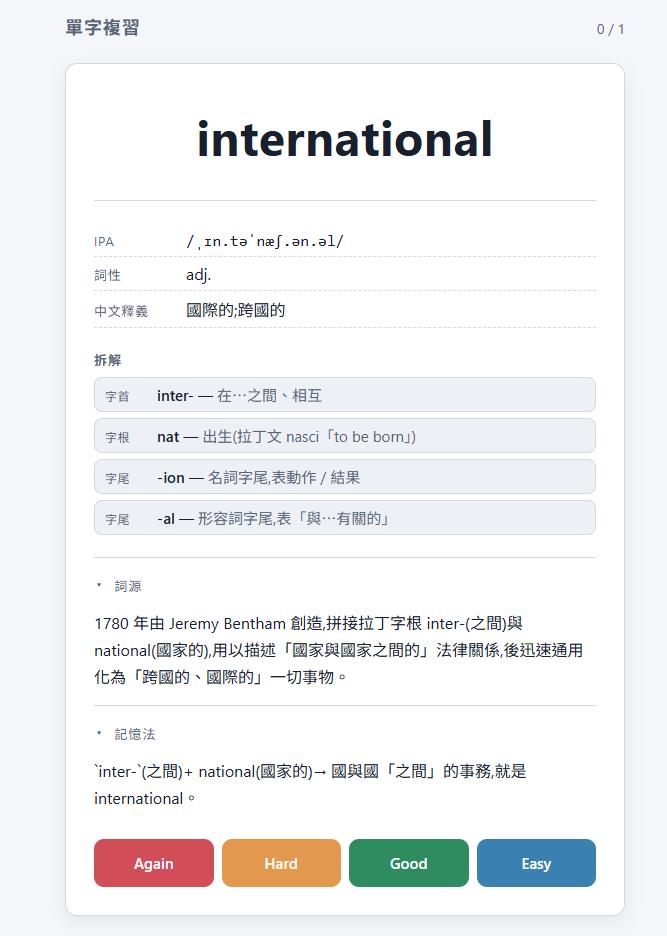
international 的完整分析與評分按鈕
What you see when reviewing
After you run /review-word, this is the flip-card
review UI you open in the browser. The front shows the English word;
the back expands the IPA, part of speech, definition, and morpheme
breakdown (prefix / root / suffix), plus collapsible etymology and
mnemonic sections. The four colour-coded buttons map directly to
SM-2 grades — one tap advances to the next card, and the day's
progress is saved automatically.
international with the grade buttons
Start here
First time? The Getting Started guide walks you through everything in about fifteen minutes.